You take the helm.
Your AI crews the busywork.

VidHelm is a free, open-source desktop video editor with an AI co-pilot built in. Cut the dead air, narrate in one take, drop sound effects on your beats, and export YouTube-ready — by hand, or by asking.

Free & open source (MIT) · Windows beta · everything runs locally — no accounts, no uploads

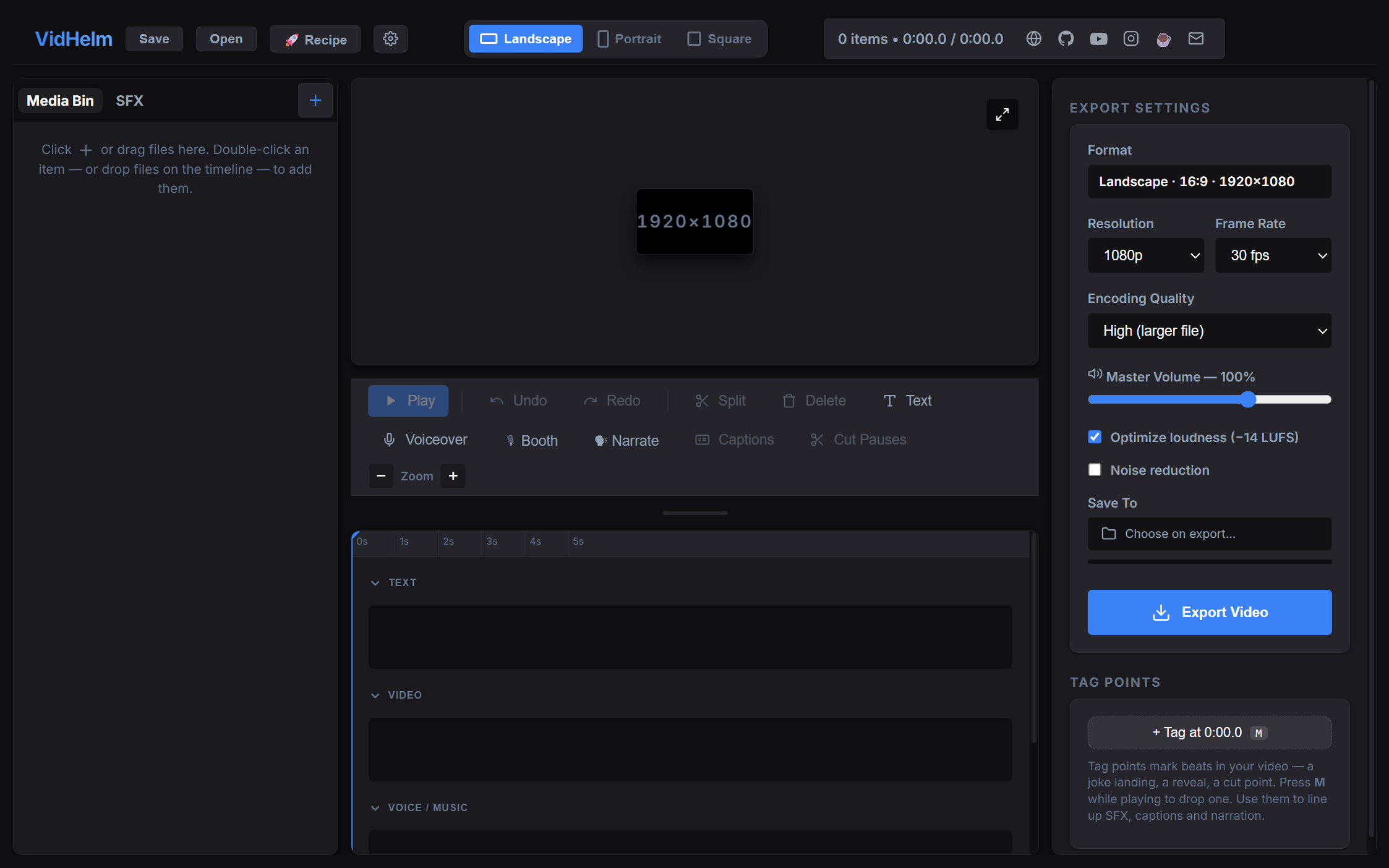
The VidHelm editor: timeline with tag points, SFX library, karaoke booth and export panel
0 accounts0 uploads13 synthesized SFX21 AI tools−14 LUFS mastered exports1 take narration

An editor built around how makers actually work

Import → tag the beats → tighten → narrate → sound → export. Every step has a fast path.

✂️

Cut Pauses, seamlessly

Finds every silent gap — or motionless stretch in silent footage — and splices it out with tiny crossfades. A rambling take becomes a tight one in one click.

🏷

Tag points

Tap M at every beat — the joke, the reveal, the pop. Tags are the language of the whole app: clips snap to them, SFX land on them, narration lines sync to them.

🎙

Karaoke booth

Paste your script and hit record: the video plays while your lines light up in time. One continuous take, no clicking between lines, lands straight on the voice track.

🗣

Cloned-voice narration

Wire in any TTS or voice-clone CLI (free local XTTS recipe included). Write lines, generate, and they're placed at your tag points automatically.

🔊

SFX library

Thirteen classic effects — whoosh, pop, boing, squish, gloop, party horn — synthesized on your machine. Zero downloads, zero licensing. Drop your own sounds in too.

📝

Auto captions

On-device Whisper transcribes the whole timeline into styled captions — phrase or word-by-word karaoke mode. Nothing leaves your computer.

🎚

Audio done right

Labeled voice / SFX lanes, drawable volume automation, and one checkbox that masters the mix to YouTube's −14 LUFS target with peaks in check.

Watch & Verify

Every export is auto-checked — loudness, true peak, black frames, sampled stills — so you never upload a broken render again.

🖼

Thumbnail builder

Sample frames from your video, pick one, type a catchy subtitle — out comes a 1280×720 thumbnail with your logo composited on.
The part nobody else has

VidHelm ships an MCP server. Point Claude (or any agent) at the repo and your AI gets 21 tools to drive the running app — while you watch it happen in your window.

I tagged all the beats. Make it fun and tighten it up.
On it — cutting 18 pauses (14s of dead air)…▸ cut_pauses · place_sfx("party", t=reveal) · add_text("wait for it…")
Done — here's a screenshot. Want the horn louder?▸ screenshot · export_video → ✓ YouTube-ready (−14 LUFS)
  • Same timeline, live. The AI's edits appear instantly in your GUI — and Ctrl+Z works on them.
  • Tag points are the shared language. You mark the beats; it hangs SFX, titles and narration on them.
  • It can see. A screenshot tool shows your AI exactly what you see, and every export returns a quality report.
  • Zero config. Open the repo in Claude Code and the server is auto-discovered. Any framework can use the plain HTTP bridge.

Start Recipes — like start G-code, for videos

Your standing instructions, run on every new video. Toggle steps on and off (off = #-commented, just like G-code), free-type anything — your AI reads it and does the busywork.

cut-pauses# tighten dead air before anything else
thumbnail# sample frames, pick one in the picker
subtitle# catchy one-liner on the thumbnail
titles 5# AI pitches 5 title options, you pick
logo bottom-right# brand watermark on every export
intro-audio# your intro sting at 0:00
# captions# toggled off — just flip the chip

Get VidHelm

Windows installer with FFmpeg bundled — nothing else to install. Or run it from source anywhere Node runs.

Developers:

git clone https://github.com/RandoTechNerd/VidHelm
cd VidHelm && npm install && npm run dev